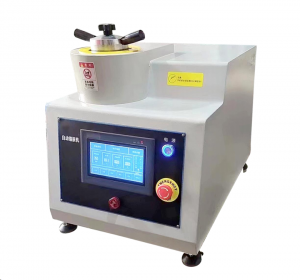
ZXQ-3S Dual-Station Automatic Mounting Press Machine


ZXQ-3S Dual-Station Automatic Mounting Press Machine
Product Introduction :
The ZXQ-3S Automatic Metallographic Sample Mounting Machine is a multi-station, fully automatic sample mounting device. The entire mounting process is program-controlled, enabling one-button operation of heating, pressurizing, loading, cooling, and unloading. The mounting program is pre-programmed, making it particularly suitable for thermosetting materials such as phenolic resin powder and bakelite powder. Using this machine makes sample preparation easier, less labor-intensive, and results in better and more stable mounting quality.
This machine can automatically heat and pressurize, and will automatically stop after cooling after pressing and forming. It can embed two samples at a time, saving time and effectively improving work efficiency.
Scope of application :
When analyzing metallographic and petrographic samples, mounting is the first step in sample preparation. This is especially important for small samples that are difficult to handle, irregularly shaped samples, or samples that require automatic grinding and polishing.
Technical parameters :
|
Sample pressing specifications |
Choose one from φ25mm,φ30mm, φ40mm,φ50mm,other size can be customized |
Total power supply |
1000W |
|
Mold cavity height |
102mm |
Cooling temperature range |
20-90℃ |
|
Effective height |
53mm |
frequency converter |
300W |
|
Effective Itinerary |
72mm |
Cooling method |
External water source cooling |
|
Heating temperature range |
100-200℃ |
Heater |
650W, 220V |
|
Product Configuration |
One bag of metallographic sample mounting powder, one thermocouple, and one plastic funnel. |
||
Sample preparation process:
1. Open the top cover, raise the bottom mold, and place the sample to be tested in the mold, with the sample facing down.
2. Add an appropriate amount of mounting powder, ensuring it covers the sample being tested;
3. Place the top mold in and rotate the top cover to fix it in place;
4. Operate the display screen, click “Start,” and wait for heating.
5. After cooling, operate the display screen, click “Lower” to open the top cover;
6. Click “Up” again to obtain the sample.